

问题现象
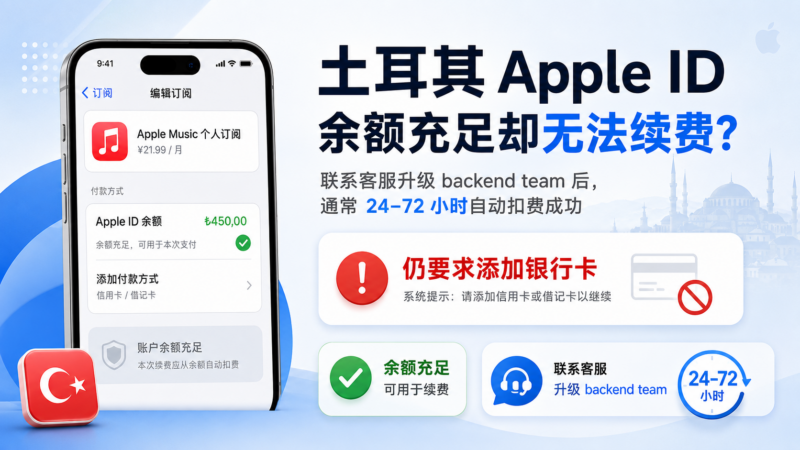
- 土耳其区 Apple ID 使用礼品卡充值后,余额充足。
- 尝试续费订阅时,系统提示必须添加信用卡/借记卡。
- 没有土耳其银行卡,纯余额无法完成支付。
- 过了续费日期后,手动操作也无效。
解决思路
这是苹果后台的支付风控限制。普通客服无法直接解除,需要升级到 backend team(后台技术团队) 处理。官方告知最多需要 72 小时,但实际案例中 24 小时内已自动扣费成功。
一步一步操作教程
第 1 步:准备进入官方支持
- 用电脑或手机浏览器打开:
https://getsupport.apple.com - 登录你的土耳其 Apple ID。
- 在搜索框输入关键词(英文效果最好):
billing problem subscription balance
或unable to pay with Apple Account balance
第 2 步:进入聊天通道
- 选择 Billing & Subscriptions 分类。
- 页面出现自助文章后,点击最下方的蓝色按钮 「Get more help」。
- 继续选择相关选项,最终进入 Chat with Apple Support 页面。
- 填写信息(姓名、邮箱会自动填充),在 Additional Details 框填写以下话术:
Hello, my Turkish Apple ID has sufficient balance from gift cards, but when I try to renew a subscription it still asks me to add a credit/debit card. I only want to use Apple Account Balance and do not have a Turkish bank card. Can you please help me allow payment with balance only or remove this restriction? Thank you.
- 点击 Continue,进入聊天队列(会生成 Case ID,例如:20000140653925)。
第 3 步:与客服沟通话术 客服接入后,按以下顺序回复:
- 先发送完整问题描述(上面那段英文)。
- 补充账户信息:
My Apple ID email is [你的邮箱], and the account region is Turkey. I only use gift card balance.
- 客服确认「It seems that you have issue with the account in App Store. Correct?」时,回复:
Yes, correct.
- 客服表示理解并去查询时,可回复:
Take your time, I'm here. Thank you!
第 4 步:客服升级处理(关键结果) 客服会回复类似内容:
I have checked and found that there is some issues which has to be fixed by our backend team so I need to escalate this to the team for you…
随后给出最终结论:
Thank you for waiting. I have escalated this to the backend team to fix the issue and it will take upto 72 hours so I would request you to try it again after 72 hours.
Please do not try within 72 hours as it can be deny again and same process will be followed again.
I hope you understand.
翻译:
后台技术团队已接手处理,最多需要 72 小时。请在 72 小时后再尝试。期间千万不要再操作付款/续费,否则可能再次被拒绝,整个流程要重来。
第 5 步:结束对话并等待 回复确认:
Understood. I will wait for 72 hours before trying again. Thank you very much for your help!
然后关闭聊天。
真实成功案例更新(2026年8月)
按照以上流程联系官方客服并升级到 backend team 后:
- 客服告知需要等待最多 72 小时。
- 实际仅过了约 24 小时,系统就自动从账户余额成功扣费完成续费。
- 无需手动再操作,问题已彻底解决。
结论:后台处理后,系统会自动触发扣款。耐心等待即可,期间严格不要尝试付款。
重要注意事项
- 严格遵守等待时间:从客服告知的时间开始计算,期间不要点任何续费、购买或“再试一次”按钮。
- 实际处理速度可能快于 72 小时(本案例 24 小时成功)。
- 如果超过 72 小时仍未自动扣费,用同一个 Case ID 再次联系支持。
- 全程建议使用英语沟通,成功率更高。
总结流程图
登录 getsupport.apple.com → 搜索 billing 关键词 → Get more help → 进入 Chat → 发送指定话术 → 客服升级到 backend team → 等待(实际可能 24 小时内自动扣费) → 问题解决。
按照以上步骤操作,绝大多数用户都能成功解除限制。本教程已根据真实成功案例更新,可直接参考使用。





暂无评论内容